

Table of Contents
- What Secure Checkout Means
- Step 1: Look for HTTPS and the Lock Icon
- Step 2: How to Check SSL Certificate Validity
- Step 3: Verify the Payment Gateway and Trust Indicators
- Step 4: Confirm PCI Compliance and Encryption Standards
- Step 5: Check for Multi-Factor Authentication and Tokenization
- Best Practices for Online Shopping Security
- Secure Payment Gateway Examples and What to Look For
Last Updated: August 12, 2026
What Secure Checkout Means
Secure checkout is a payment process that protects your financial information through encryption, authentication, and compliance standards designed to prevent fraud and data theft. A legitimate online retailer implements multiple layers of protection: SSL certificates that encrypt data in transit, payment gateways that tokenize your card information, and PCI compliance standards that govern how merchants handle sensitive payment data.
Understanding how to verify secure checkout matters because you bear the risk when something goes wrong. If a checkout isn't properly secured and your information is compromised, you're the one dealing with fraudulent charges, identity theft, or lengthy disputes. That's why learning to spot a genuinely secure checkout is essential to shopping safely online.
Step 1: Look for HTTPS and the Lock Icon
The first indicator of a secure checkout is HTTPS in the URL and a lock icon in your browser's address bar. HTTPS (Hypertext Transfer Protocol Secure) means the website uses SSL encryption to protect data traveling between your browser and the merchant's server.
When you navigate to checkout, examine the URL. It should begin with "https://" not "http://". HTTP sends data in plain text; anyone intercepting that connection can read your credit card number and address. HTTPS encrypts that data so it appears as gibberish to interceptors.
Next to the URL, you should see a small lock icon. In most modern browsers (Chrome, Firefox, Safari, Edge), this lock appears to the left of the address bar. Clicking on it reveals information about the SSL certificate protecting that connection.
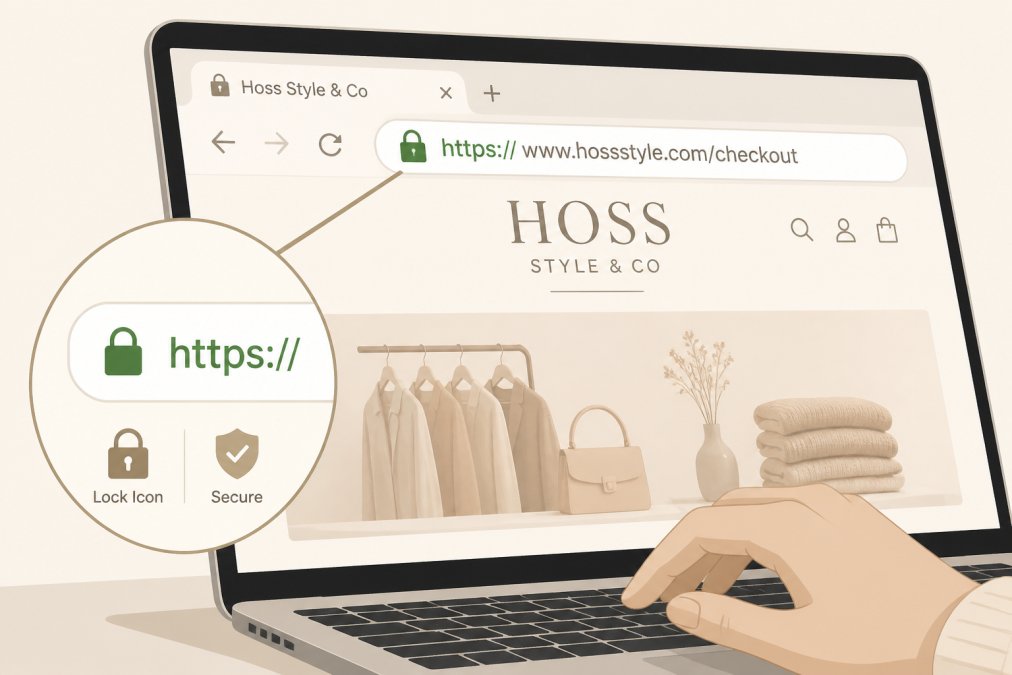
Important caveat: HTTPS and a lock icon are necessary but not sufficient. Scam websites can also use HTTPS. This is why HTTPS is your first check, not your final check. You need to verify what's behind that encryption.
Step 2: How to Check SSL Certificate Validity
An SSL certificate is the digital credential that enables HTTPS encryption. Clicking on the lock icon reveals details about the certificate protecting that connection. You're looking for three pieces of information: the certificate holder's name, the certificate's validity dates, and the issuing authority.
Click the lock icon in your address bar and look for an option like "Certificate" or "View Certificate Details." The most critical field is the certificate holder's name or organization. This should match the website you're visiting. If you're shopping at Hoss Style & Co LLC and the certificate is issued to a completely different company, that's a red flag.
Next, check the validity dates. Every SSL certificate has an expiration date. A certificate that expired months ago means the merchant either forgot to renew it or abandoned the site. The current date should fall within the "Valid from [date] to [date]" range.
Finally, verify the certificate issuer. Legitimate SSL certificates come from recognized Certificate Authorities like DigiCert, Sectigo, GlobalSign, or Let's Encrypt. If the certificate is self-signed or issued by an unknown authority, that's suspicious. Major retailers use certificates from established, trusted authorities because browsers trust these issuers.
Step 3: Verify the Payment Gateway and Trust Indicators
The payment gateway is the service that processes your credit card transaction. It sits between the merchant's website and your bank, handling payment authorization. Identifying which payment gateway a website uses tells you something important about their security practices.
Common, reputable payment gateways include Stripe, Square, PayPal, Authorize.net, and Braintree. These companies have established reputations, undergo regular security audits, and maintain compliance with industry standards.
To identify the payment gateway, look at the checkout page itself. Many gateways display their logo or name. PayPal checkouts show PayPal branding. Stripe-powered checkouts often show "Powered by Stripe" at the bottom. If you're redirected to a payment page, check the URL. It should match the payment processor's domain.
Beyond the payment gateway, look for trust indicators on the checkout page: security seals, trust badges, and certification logos like Norton Secured, McAfee Secure, Trustwave, and SSL.com. These badges indicate the website has passed security scans and meets specific security standards.
Also look for clear contact information and a privacy policy. Legitimate retailers display their address, phone number, and email. They maintain a detailed privacy policy explaining how they handle your data. Scam sites often lack this information or provide fake contact details.
Step 4: Confirm PCI Compliance and Encryption Standards
PCI DSS (Payment Card Industry Data Security Standard) is the industry requirement that governs how merchants handle credit card information. If a merchant accepts credit cards, they must comply with PCI standards.
The core principle is this: merchants should never store complete credit card numbers in plain text. Instead, they use tokenization, where the card number is replaced with a unique token that has no value if stolen. When you make a purchase, the actual card number is sent directly to the payment processor, not stored on the merchant's server.
You won't see PCI compliance status displayed on a checkout page, but you can infer compliance from the checkout design. If the checkout redirects you to a secure payment processor or uses hosted payment fields that send card data directly to the processor, that's a good sign.
Encryption standards matter as well. Modern secure checkouts use TLS 1.2 or higher (TLS stands for Transport Layer Security, the successor to SSL). When you view certificate details, the information should indicate TLS 1.2 or TLS 1.3. Older encryption standards like TLS 1.0 or 1.1 are considered outdated and vulnerable.
Step 5: Check for Multi-Factor Authentication and Tokenization
Multi-factor authentication (MFA) adds an extra security layer by requiring you to verify your identity through multiple methods before completing a purchase. This might include a password, a code sent to your phone, a biometric scan, or a security question. If a checkout requires MFA, that's a positive sign.
Tokenization, mentioned earlier, is one of the most effective protections against data breaches. When you enter your card information at a secure checkout, the payment processor converts that information into a unique token with no value on its own. Your actual card number is never stored on the merchant's server. If a hacker breaches the merchant's database, they get tokens, not credit card numbers.
Some advanced checkouts use 3-D Secure, an additional authentication protocol that adds another verification step. If you encounter 3-D Secure during checkout, complete it. It's another layer of fraud prevention.
Best Practices for Online Shopping Security
Beyond verifying individual checkout elements, certain practices protect you across all your online purchases. First, never save your credit card information to a website unless absolutely necessary. The fewer places your card information is stored, the fewer targets hackers have.
Second, use a unique, strong password for each online retailer. Password reuse is one of the biggest security mistakes people make. A password manager like Bitwarden, 1Password, or LastPass generates and stores unique passwords for each site.
Third, monitor your bank and credit card statements regularly. Check for unauthorized transactions. Most credit card companies offer fraud protection, but you need to report unauthorized charges promptly.

Fourth, shop only during secure connections. If you're on public Wi-Fi at a coffee shop, avoid entering payment information. Use a VPN (virtual private network) to encrypt your connection if you must shop on public Wi-Fi.
Fifth, verify the merchant's legitimacy before purchasing. Check for customer reviews on independent review sites. Look for physical address and contact information. Read the return policy and shipping details. Legitimate retailers provide clear, detailed information.
Finally, trust your instincts. If something feels off about a website, unusual design, grammatical errors, aggressive sales tactics, or pressure to complete purchase quickly, leave the site. There are thousands of legitimate retailers online.
Secure Payment Gateway Examples and What to Look For
Understanding which payment gateways offer the best security helps you identify trustworthy checkouts. Stripe is one of the most widely used payment processors, particularly among e-commerce retailers. Stripe handles encryption, fraud detection, and PCI compliance on the merchant's behalf.
PayPal is another major player that offers strong security. PayPal checkouts redirect you to PayPal's secure servers, keeping your card information off the merchant's site entirely. PayPal also offers buyer protection.
Square is popular among small and medium-sized retailers. Square provides point-of-sale systems and online payment processing with fraud detection tools and PCI compliance infrastructure.
Authorize.net is one of the oldest payment processors, serving merchants since 1996. It's particularly common among established e-commerce sites and maintains strict security standards.
When evaluating a checkout, look for payment gateways you recognize. The safest checkouts redirect you to the payment processor's secure servers. The next safest use hosted payment fields that send card data directly to the processor without the merchant's server touching it.
Hoss Style & Co LLC uses industry-standard payment processing to ensure your financial information is protected throughout the checkout process. When you shop with retailers that prioritize security infrastructure, you're reducing your personal risk significantly.
| Security Element | What to Look For | Why It Matters |
|---|---|---|
| HTTPS Protocol | URL starts with "https://" | Encrypts data in transit |
| Lock Icon | Visible in address bar | Indicates active encryption |
| SSL Certificate | Valid, matches domain name | Confirms legitimate connection |
| Payment Gateway | Recognizable processor name | Indicates professional security infrastructure |
| PCI Compliance | Not stored as plain text | Protects card information from breaches |
| Multi-Factor Authentication | Additional verification required | Prevents unauthorized access |
| Trust Badges | Norton, McAfee, Trustwave seals | Indicates security scans and certification |
| Tokenization | Card replaced with unique token | Minimizes value if data is stolen |
Shopping online securely starts with recognizing the technical safeguards protecting your payment information. When you verify HTTPS, check SSL certificates, identify reputable payment gateways, and confirm encryption standards, you're taking control of your security. Retailers like Hoss Style & Co LLC invest in these protections to build customer trust and ensure your shopping experience is safe. By applying the verification steps in this guide, you'll shop with confidence knowing you've done everything within your control to protect your financial information.
Frequently Asked Questions
How can I tell if a checkout is secure?
Look for three key signs: HTTPS in the URL (not HTTP), a green lock icon in your browser's address bar, and trust badges or security certifications displayed on the checkout page. Hover over the lock icon to view the SSL certificate details. Reputable retailers like Hoss Style & Co display these indicators prominently. If any are missing, avoid entering payment information.
What does a secure payment gateway mean?
A secure payment gateway is a service that encrypts and processes your payment information safely between your browser and the merchant's server. It uses encryption protocols and tokenization to prevent fraudsters from accessing your card details. Major secure payment gateways comply with PCI DSS standards and use 3-D Secure authentication for added fraud prevention. This protects both you and the retailer.
Does a padlock icon guarantee a secure checkout?
The padlock icon indicates HTTPS encryption is active, which is essential, but it's not a complete guarantee of security. A secure checkout requires the padlock plus valid SSL certificate, PCI compliance, and a trustworthy merchant. Scammers can obtain SSL certificates, so verify the certificate details by clicking the lock icon and checking the domain matches the retailer's official website. Always verify secure checkout using all five steps, not just the icon.
What should I do after completing a secure checkout?
Check your confirmation email immediately for accuracy of order details and total amount. Verify the sender's email address matches the retailer's official domain. Review your payment statement within a few days to ensure only the correct charge appears. Enable account notifications if the retailer offers them. Save your order confirmation number and tracking information. Monitor your credit card statements for 30 days for any unauthorized charges.
This article was written using GrandRanker


